
Machine monitoring is one of those investments which most manufacturers know they should make, but few actually do. The technology is not the obstacle. The obstacle is the conversation. Who needs to approve it? What questions they will ask? You need to walk in with numbers that will answer those questions before they are asked. This post is about what those numbers … [Read more...]
Extending CIMCO Edit with Machine Simulation
CIMCO Edit ships with a solid backplotter and a GPU-accelerated solid simulation engine. For a lot of shops, that is enough for everyday verification. But there is a category of risk that backplot cannot touch. And if your shop runs complex multi-axis programs, expensive materials, or tight fixtures, you have probably run into this. Backplot operates in a geometric … [Read more...]
Tech Tip: CIMCO MDM Remote Request: Let DNC-Max Handle the Delivery

This Tech Tip explains how to configure CIMCO MDM Remote Request to identify the correct file and let DNC-Max handle reliable delivery to the CNC machine. CIMCO MDM's Remote Request can work two ways. It can identify the file and deliver it directly, or it can identify the file and hand delivery off to a DNC-Max port. That second option is configured in the Machine field … [Read more...]
Tech Tip: Use CIMCO DNC-Max to Prevent Upload and Remote Request Conflicts
This Tech Tip explains how to keep uploads and requests from stepping on each other using CIMCO DNC-Max. When Auto Receive and Remote Request are both active on the same serial port, DNC-Max is receiving programs from two directions for two different reasons. Without a way to tell them apart, a request program sent by the operator to trigger a file transfer looks … [Read more...]
Extending CIMCO Edit with DNC-Max
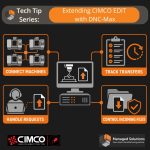
CIMCO Edit includes a built-in DNC module for sending and receiving NC programs over RS-232 serial and FTP connections. For a single machine or a small setup where one programmer handles transfers from one PC, that built-in capability handles the job well. Configure the port, name the machine, and sending a program is a dropdown selection and one click. As the shop grows, … [Read more...]
Extending CIMCO Edit with NC-Base
CIMCO Edit opens, edits, simulates, and sends NC programs. What it does not do is manage them. There is no version history, no access control, no searchable database, no record of which revision went to the floor or when. Programs live wherever the programmer saved them last, usually a shared drive with a folder structure that made sense when the shop had twelve programs … [Read more...]