 This Tech Tip explains how to restore files in CIMCO NC-Base with a fast, non-destructive rollback when a program save goes wrong.
A programmer saves a file and immediately knows it was wrong. In CIMCO NC-Base, the fastest recovery is Restore Latest.
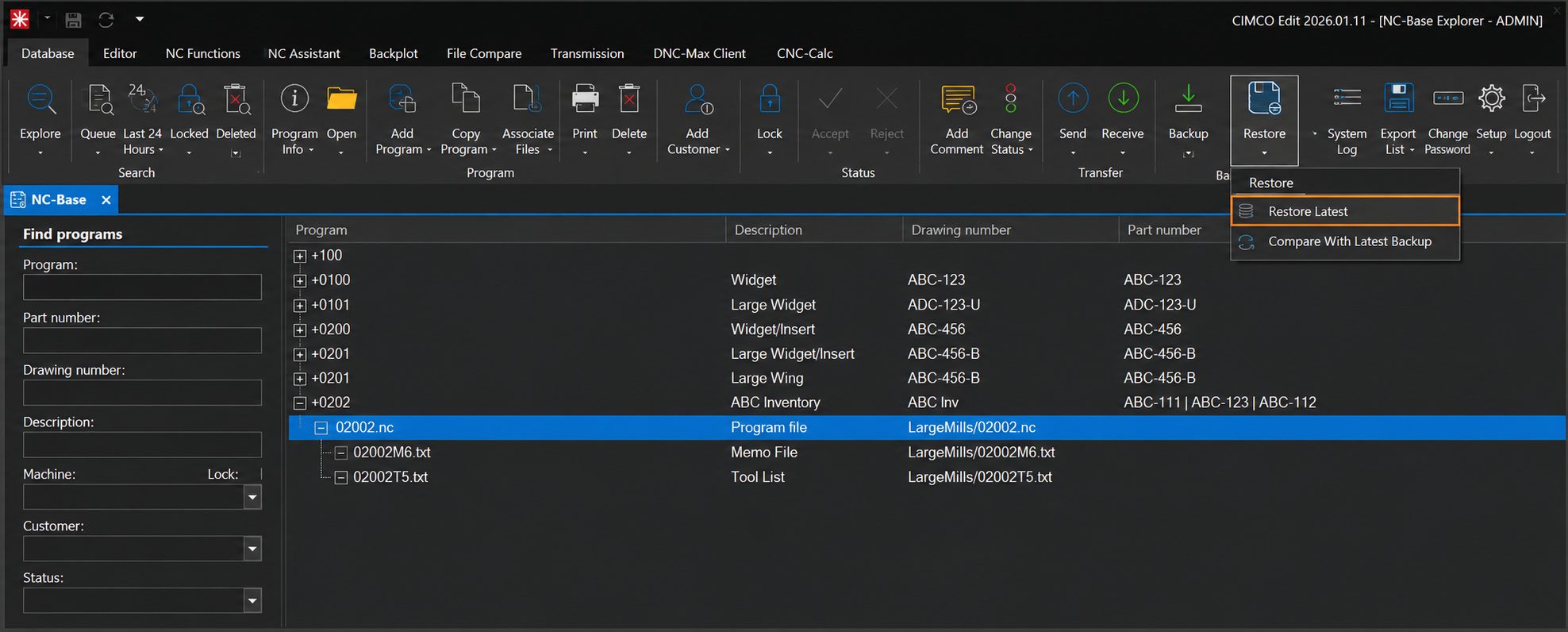
Click the “Restore” button dropdown or right-click the file and the option is available in the restore menu. One click, no dialogs, no hunting through backup history.
What makes it worth knowing is what happens under the hood. The restore is non-destructive. The version you just replaced gets added to the top of the backup history, so if Restore Latest turns out to have been the wrong call, you can go back into the Restore dialog and recover the displaced version. You are never making an irreversible decision.
Save the wrong thing, restore in one click. Restore the wrong thing, go back one more step. NC-Base keeps the door open either way.
Want to see how NC-Base handles version control and program management? Check out our full CIMCO NC-Base product overview to see everything it can do.
If you’d like help configuring your CIMCO software environment, please contact us. We’re happy to help!
