 This Tech Tip explains how to test your CIMCO DNC-Max Auto Receive trigger before it costs you a transfer.
The most common Auto Receive failure is a trigger mismatch. DNC-Max is listening, the machine sends the program name, and nothing happens because the trigger format does not match what the control actually transmitted. By the time someone figures out why the transfer did not come through, the machine is waiting.
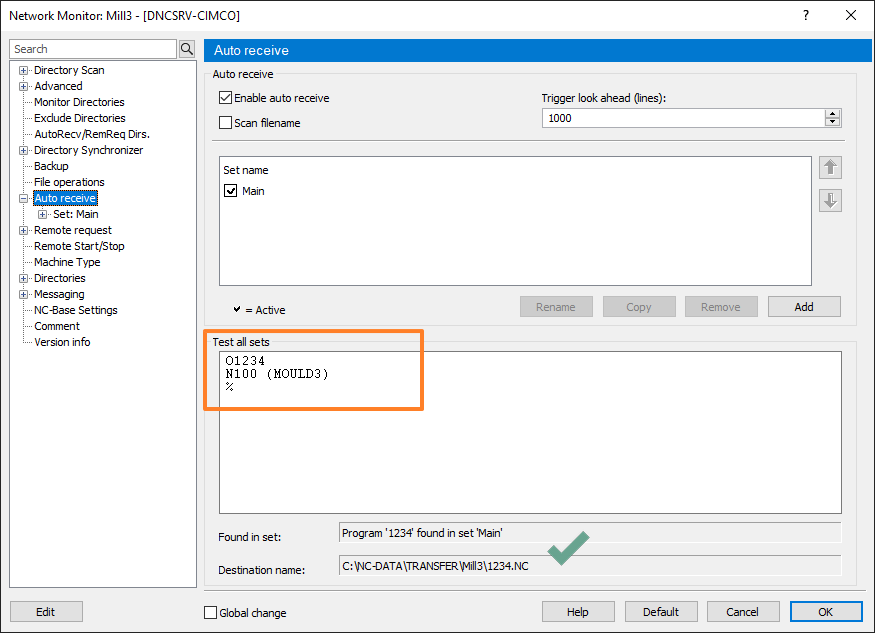
You can catch this before it ever becomes a problem. In the Auto Receive set list dialog, paste a sample of what the machine sends into the test field and it will test all sets. It shows you which set fires and what filename would be generated, all without touching live data or initiating an actual transfer.
Make it a habit: run the test every time you configure a new set or change a trigger format. Thirty seconds there saves a lot of troubleshooting later.
Check out our full CIMCO DNC-Max product overview to learn everything it can do.
If you’d like help configuring your CIMCO DNC-Max environment, please contact us. We’re happy to help!
