
This Tech Tip explains how to scale feedrates in CIMCO Edit without going back to CAM.
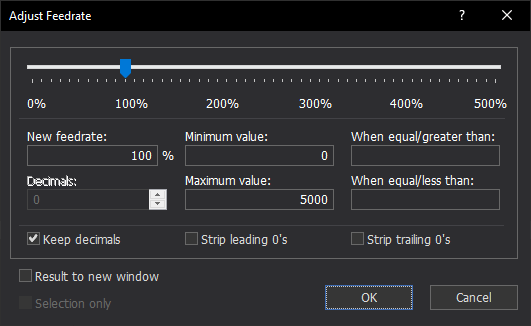
Adjust Feedrate in CIMCO Edit handles rate changes in seconds. Find it under NC Functions / Transform. Set your percentage, apply minimum and maximum clamps to keep any value from going out of range, and optionally restrict the adjustment to feedrates within a specified range so you are only touching what you intend to.
Before you commit, use Result to New Window to review the adjusted program alongside the original. When it looks right, apply it. No CAM session, no repost.
Want to see what else CIMCO Edit can do on the shop floor? Check out our full CIMCO Edit overview to see everything it can do.
If you’d like help configuring your CIMCO Edit environment, please contact us. We’re happy to help!
