 This Tech Tip explains how to keep uploads and requests from stepping on each other using CIMCO DNC-Max.
When Auto Receive and Remote Request are both active on the same serial port, DNC-Max is receiving programs from two directions for two different reasons.
Without a way to tell them apart, a request program sent by the operator to trigger a file transfer looks identical to a program the machine is uploading to be saved.
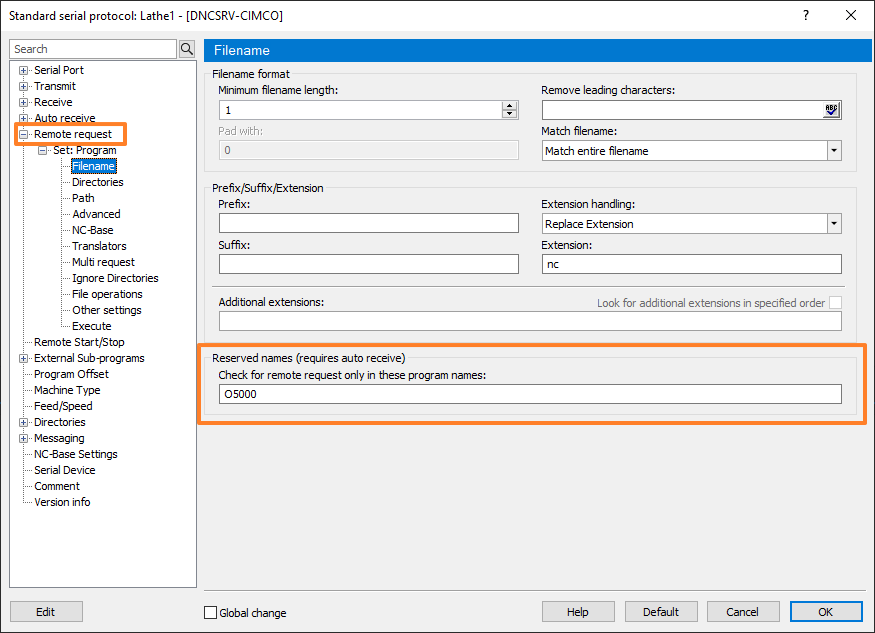
Reserved Names solves this. Configure a program number — O9999 is a common choice — as a Reserved Name in the Auto Receive set. When DNC-Max receives a program with that O number, it treats it as a Remote Request instead of saving it.
The detail that matters is that the reserved number on the DNC-Max side must match exactly what the machine actually sends.
Get this wrong and request programs silently become saved files. No error, no warning — just transfers that never happen and a backup history filling up with programs that should not be there.
Want to see how DNC-Max manages machine communication? Check out our full CIMCO DNC-Max product overview to see what it can do.
If you’d like help configuring your CIMCO software environment, please contact us. We’re happy to help!
