Extending CIMCO Edit with NC-Base
CIMCO Edit opens, edits, simulates, and sends NC programs. What it does not do is manage them. There is no version history, no access control,
Your Smart Manufacturing Partner
Joe’s TLDR Summary
CIMCO NC-BASE is a structured, searchable, SQL-backed program database that replaces the shared drive chaos with version control, status management, access control, and a controlled transfer workflow tied directly to CIMCO Edit. It helps manufacturers improve traceability, prevent revision errors, and ensure that the right program reaches the right machine every time.
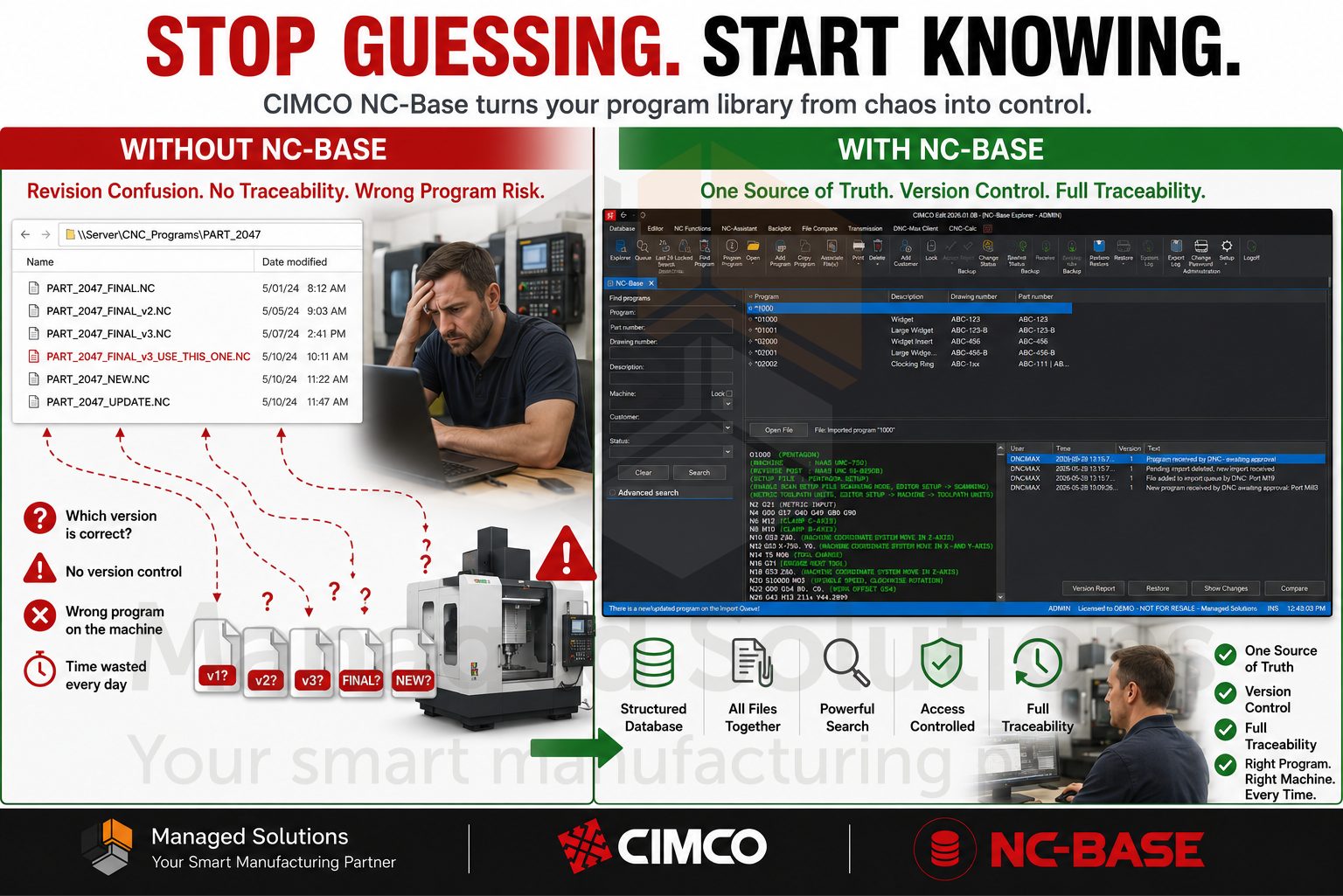
Does the CNC program library for your shop live in a folder on a network drive with names like PART_final_v3_USE_THIS_ONE.nc?
Have you ever had a machinist run the wrong revision because two people saved different versions to the same directory?
If you have spent more than ten minutes trying to find a program for a job that ran six months ago, then keep reading.
CIMCO NC-Base is a structured, searchable, SQL-backed CNC program database that lives alongside CIMCO Edit and turns your program library from a pile of files into an organized, auditable, access-controlled system, and it’s exactly what you are missing.
The difference between running a shop with NC-Base and without it is the difference between a filing cabinet and a shoebox.
Let’s get into it.
CIMCO NC-Base is a CNC program management tool built on a client-server architecture. The server runs in the background as a Windows service, handling data storage and processing. The client, called the NC-Base Explorer, gives programmers and operators a searchable interface for finding, opening, editing, sending, and receiving programs, all from within CIMCO Edit.
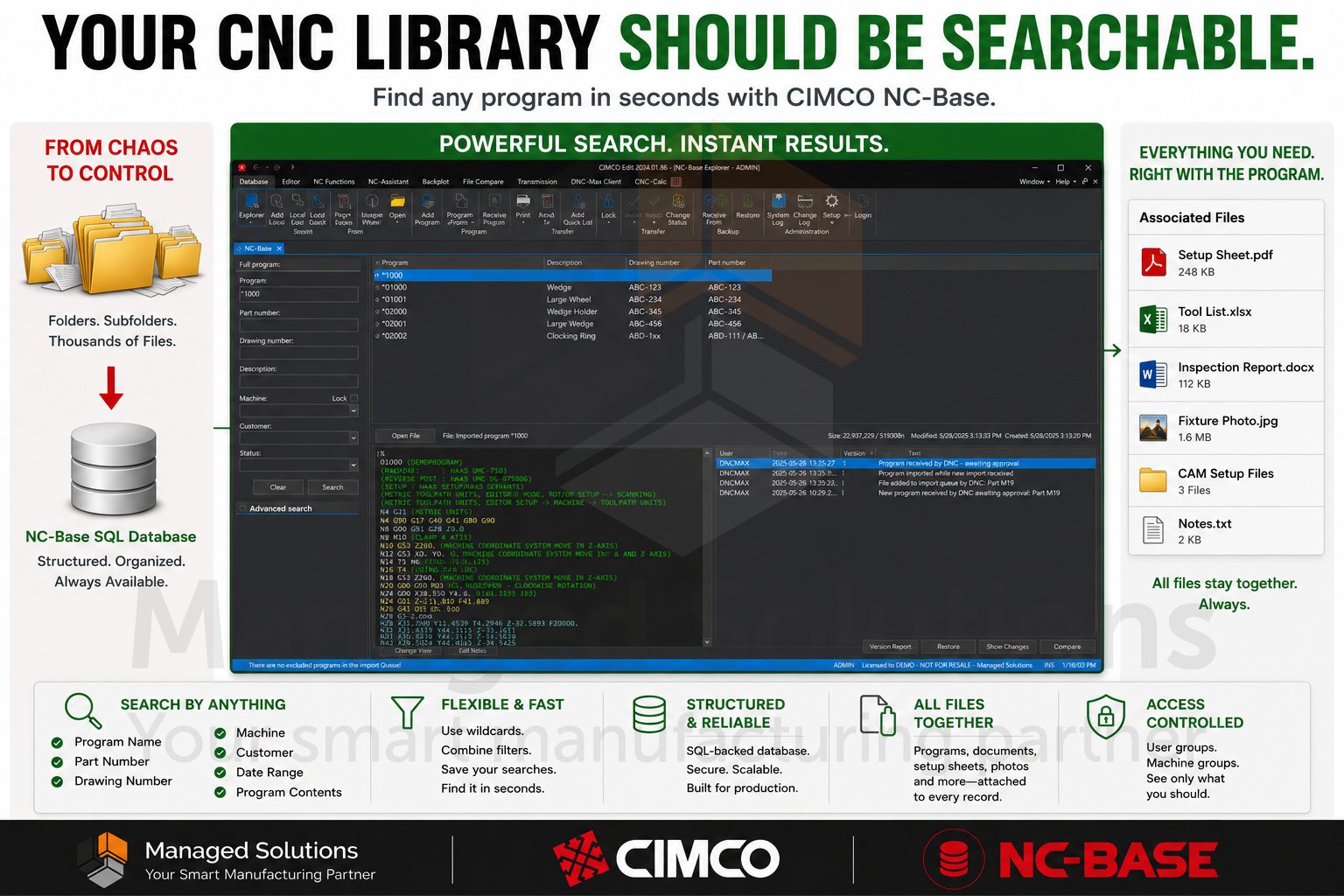
The database stores more than just program files. For every program in the system, you can attach associated files: setup sheets, tool lists, PDFs, photos of tricky fixturing, inspection documents, and anything else the operator needs to run the job correctly. Instead of sending a program to the floor and hoping the setup sheet is somewhere obvious, everything travels together as a complete package tied to that program record.
The search engine is flexible enough to handle the way shops actually work. You can search by program name, part number, drawing number, machine, customer, status, date range, or the content inside the NC file itself. You can use wildcards. You can save search combinations. On a shop running hundreds or thousands of programs, finding the right file goes from a fishing expedition to a ten-second lookup.
Each program in NC-Base is a record in the database. That record has structured fields, a machine assignment, a customer association, a status flag, and a version history. You define what the custom fields mean for your operation: part number, drawing revision, material, work order, whatever fits your workflow. NC-Base supports up to nine custom text fields in addition to the standard ones, and any of those fields can be made searchable from the Explorer.
When a program is added to the database, NC-Base reads the file and automatically populates fields it can extract, depending on how your triggers are configured. If your shop embeds part numbers or drawing numbers in the program header as comments, NC-Base can scan those lines and pull that data into the database record automatically. No manual data entry, no fields left blank because someone was in a hurry.
The machine grouping system ties programs to specific machine types or machine groups. A Fanuc VMC program and an Okuma lathe program are not mixed together in the same pool. Operators on the floor only see programs for their machines. You can lock that down by user group so a mill operator cannot accidentally pull up a lathe program, or worse, send one to the wrong machine.
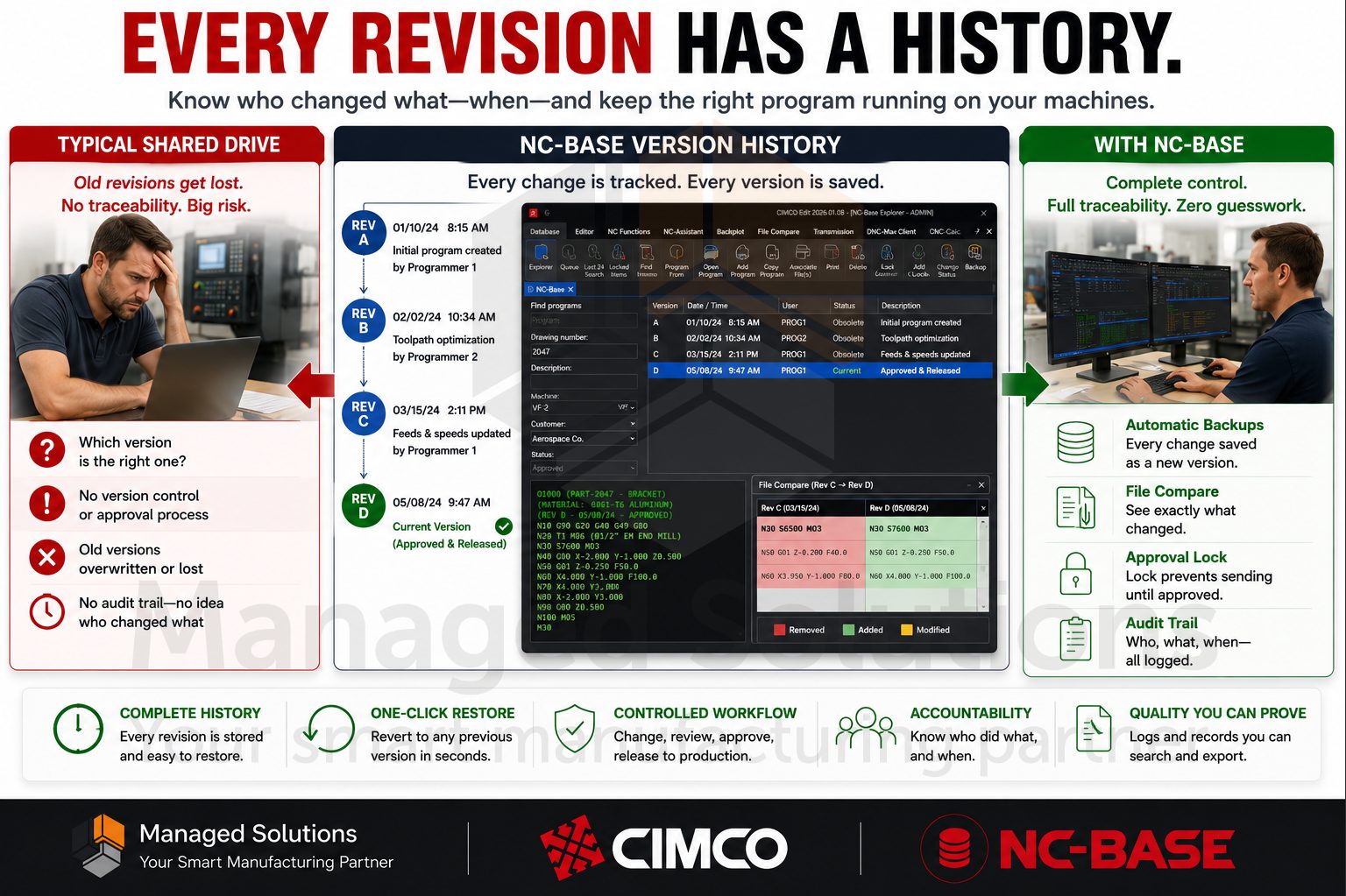
This is the feature that pays for NC-Base in shops with a revision control problem. And let’s face it, most shops have had one at some point.
Every time a program in NC-Base is modified and saved, the system creates a backup of the previous version automatically. That backup is stored in the database, accessible from the Backup menu, and you can restore any prior version with a few clicks. You can also compare any version against the current one using CIMCO Edit’s File Compare. So, you can see exactly what changed between the version running in production today and one that ran six months ago.
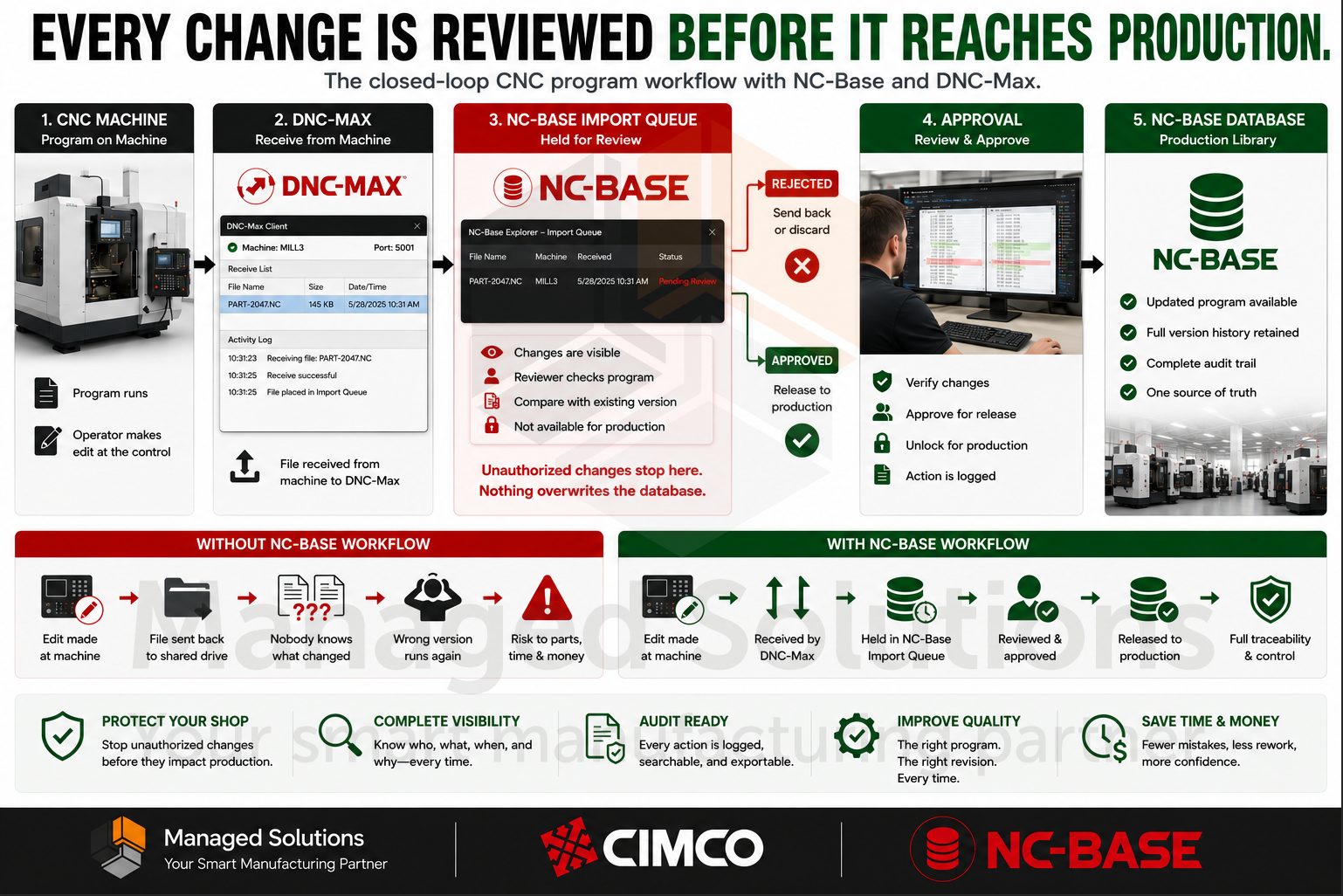
The locking system adds another layer. When a program is locked, it cannot be transferred to a CNC machine. This is the mechanism which enforces your approval workflow: a programmer makes a change, the program gets reviewed, and only after it is unlocked and approved does it become eligible to be sent to the floor. The import queue integrates with CIMCO DNC-Max so programs received from CNC machines can be held for review before they overwrite anything in the database.
Every action in the system is logged. Who opened the file, who edited it, who changed the status, what time it happened. The system log is searchable and exportable. This matters significantly if you are running a shop under any kind of quality certification or documentation requirement.
Real-world example: A shop running aerospace components had a situation where a program was modified at the machine control and then received back into their system without anyone noticing it had changed.
The modification was subtle, a feedrate override baked into the code, and it caused a batch of parts to come in slightly undersized.
With NC-Base’s import queue and the system log, that kind of unauthorized change would have been flagged before it ever touched production. The received file would have sat on the queue waiting for review, and the log would have shown exactly what came back from the machine and when.
NC-Base runs on a SQL relational database. That is a strength because SQL databases are fast, reliable, and structured. It is also a responsibility because a SQL database is not just a folder of files you can copy to a thumb drive. You need to back it up properly or you risk losing not just your programs but your entire version history, your associated files, your custom field data, and your audit log.
Here is how the backup system works and how to use it correctly.
In NC-Base, go to Administration > Setup > Backup.
The Backup section has two separate things you need to understand:
1. Backing up individual programs (file-level backups that happen automatically as programs are modified), and
2. Backing up the entire database (a full system backup that captures everything).
The full database backup creates a .ncb file that contains the database contents and, if you check the “Backup files” option, all of the associated program files as well.
That .ncb file is your recovery point. If the server machine dies, if the database gets corrupted, or if someone purges something they should not have, that file is how you restore everything.
Click Backup, choose your destination, make sure “Backup files” is checked, and let it run.
Restoring is just as straightforward.
Go back to the Backup section, click Restore, point it at your .ncb file, and choose whether to restore just the database, the files, or both.
There is also an “Overwrite existing files” option and a post-restore integrity check, which you should always run. The integrity check finds and cleans up any database references pointing to files which no longer exist on disk. This is exactly the kind of quiet corruption that causes problems weeks later if you do not catch it now.
NC-Base keeps deleted programs in a soft-deleted state, meaning they do not vanish immediately. You can restore a soft-deleted program.
But over time, those deleted records and their associated backup versions accumulate. The Maintenance section under Setup lets you purge deleted programs older than a specified number of days, and separately purge backup versions beyond a specified count per file.
The “Keep how many backups” setting is particularly useful. Set it to something like 10, and NC-Base will always keep the 10 most recent backups of any program while purging older ones. This gives you a meaningful revision trail without the database growing without limit. Run the Calculate function first before you run Start, it shows you exactly what would be purged so there are no surprises.
PRO TIP FROM THE SHOP FLOOR:
Schedule your full database backups to run automatically and copy the resulting .ncb file to a location that is not on the same machine as the NC-Base server.
This sounds obvious but it gets skipped constantly. If the server drive fails, a backup sitting on the same drive is not a backup. Map a network share, point the backup destination there, and set up the CIMCO Database Backup Server so it happens without anyone needing to remember it.
Also, after you set up your backup routine, go ahead and actually test a restore.
Spin up a test instance, restore from your latest .ncb file, and verify your programs and associated files come back intact.
A backup you have never tested is a backup you do not actually have.
The NC-Base Explorer search interface is designed so that almost any search term gets you to the right program fast.
Basic search covers program name, machine, customer, and status.
Advanced search extends that to all fields simultaneously, file contents, date ranges, locked and unlocked status, read-only flags, and deleted programs.
Wildcards work the way you expect. Searching for MOULD* returns everything starting with MOULD. Searching for *BRACKET* finds it anywhere in the name.
If your naming conventions are consistent, a two-second search returns exactly what you need.
If your naming conventions are not consistent, that is a conversation NC-Base tends to prompt in shops pretty quickly, because suddenly the cost of inconsistent naming becomes visible.
The column layout in the search results is customizable. Right-click any column header to add or remove fields, drag columns to reorder them, and resize them to fit your workflow. Administrators can lock that layout for users so the floor is not rearranging the interface.
NC-Base integrates with CIMCO DNC-Max for program transfer, which means the same system managing your program library is also the one controlling what goes to your machines.
From the NC-Base Explorer, you select a program and click Send. If DNC-Max is configured, it handles the transfer. The program does not leave the database as a loose file that someone can accidentally overwrite or misplace.
The receive workflow is equally controlled. When a program comes back from a CNC machine, it can be placed on the import queue rather than automatically overwriting the database record. An authorized user reviews it, compares it to the current version if needed, and either accepts it or rejects it. This one step closes the loop on a workflow gap which causes quality incidents in shops that do not have it.
If you are currently using the DNC module built into CIMCO Edit for transfers without NC-Base, that works fine at small scale. But the moment you need traceability, the moment you need to know the program currently running on Machine 7 is the approved version and not something an operator modified last Tuesday, you need the full stack. Our article on how CIMCO DNC-Max functions as Industry 4.0 middleware explains this gap.
Not everyone in your shop needs the same level of access to your program library.
The NC-Base user group system lets you define exactly who can do what. Operators might be able to search and view programs but not edit or delete them. Programmers can add and modify programs for their assigned machine groups but not touch programs for other areas. Administrators have full access.
The permissions list is granular. You can control access to individual functions: who can lock or unlock programs, who can purge deleted files, who can add customers, who can modify the database configuration. The “Allowed machines” setting ties user groups to specific machine groups, so a user literally cannot see or access programs for machines they are not authorized to work with.
Windows authentication integration is available as well. If your shop runs Active Directory, NC-Base can use the current Windows username for login. That is one less password for operators to manage and one less login screen between them and the program they need.
One of the more powerful things you can do once NC-Base is running is tie it together with CIMCO Edit macros so that database fields populate program headers automatically.
We have documented this workflow in detail in two articles on our blog page:
The short version: NC-Base exposes its database field values as variables that CIMCO Edit macros can read.
Build a macro that pulls the part number, drawing number, customer name, and revision level from the database record and writes them into the program header automatically.
The result is a program library where every file’s header matches the database record, because the database record is the source of truth. No more headers that say Rev A when the database says Rev D.
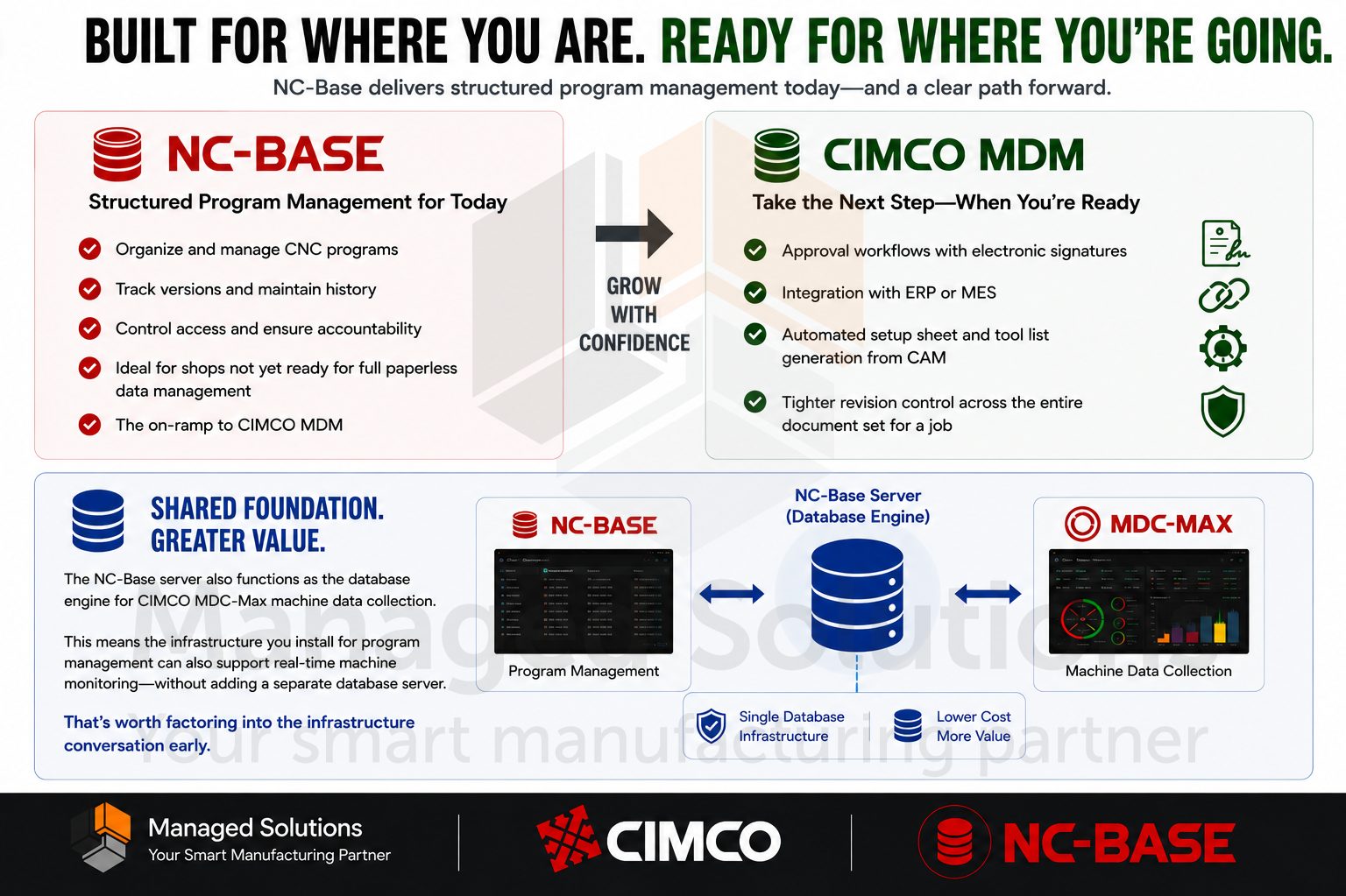
NC-Base is a powerful tool for shops that need structured program management but are not yet ready for a full paperless manufacturing data management platform.
It is also the on-ramp for CIMCO MDM. If your shop grows to the point where you need approval workflows with electronic signatures, integration with your ERP or MES, automated setup sheet and tool list generation from CAM, or tighter revision control across the entire document set for a job, CIMCO MDM is the next step and NC-Base is not far from it architecturally.
The NC-Base server also functions as the database engine for CIMCO MDC-Max machine data collection. This means the infrastructure you install for program management can also support real-time machine monitoring without adding a separate database server. That is worth factoring early on into the infrastructure conversation.
Revision Control & Audit Tracking
Track every program change with automatic version history and detailed audit logs. Easily compare revisions, restore previous versions, and maintain complete traceability.
Centralized CNC Program Management
Keep all CNC programs organized in a secure, searchable database instead of scattered across network folders. Quickly find the correct program, associated documents, and job information in seconds.
Controlled Program Distribution
Ensure only approved programs reach the shop floor through secure machine transfer workflows. Review, verify, and control program changes before they impact production.
Shop Floor Documentation & Access Control
Give operators instant access to setup sheets, tool lists, drawings, and other critical documents alongside the CNC program. Control user permissions to ensure the right people have access to the right information.
CIMCO NC-Base is available as an add-on to CIMCO Edit and runs on any Windows environment.
Your programs are worth more than a shared drive folder. Treat them that way.
If you want to see NC-Base in action, talk through whether it fits your shop workflow, or better understand where it fits relative to CIMCO MDM for your situation, please contact us.
We have been implementing CIMCO NC-Base since early days and know how to get it configured right the first time.
Start your free 30-day Demo of CIMCO products today.

CIMCO Edit opens, edits, simulates, and sends NC programs. What it does not do is manage them. There is no version history, no access control,

This Tech Tip explains how to restore files in CIMCO NC-Base with a fast, non-destructive rollback when a program save goes wrong. A programmer saves
At some point, almost every shop that has been running CIMCO Edit for a while runs into the same conversation. The shared drive is not