
We have a problem, many of our customers know the CIMCO product because of it's prolific Editor. Don't get me wrong, it's great to be a re-seller of the top NC Editor on the market. The product sells itself and many people who contact us are ready to hand over some of their hard earned cash without asking a single question. They already know that the backplot feature will help … [Read more...]
CIMCO Version 8 User Interface
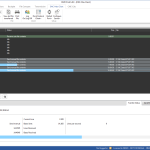
Back in 2006 when I started getting to know CIMCO Software, I noticed something that stood out. Their interface was clean and modern. It seems silly, but in the rapidly evolving software world, looks matter. It shows a company that is committed not to just providing a quality product, but one that cares that the user experience is up to date. Never mind the fact that CIMCO is … [Read more...]
How to Lock the Reset Button on Moxa Nport Devices
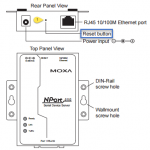
Recently we had a customer who had a number of ports go offline on their CIMCO DNC Max system. After doing some troubleshooting it was determined that all of the Moxa devices in question had been reset to the factory default IP Address of 192.168.127.254. This indicates that the reset button had been triggered. Once you've configured a Moxa NPort device for a critical DNC, bar … [Read more...]
Coming Soon CIMCO Software Version 8
In November of 2015 CIMCO A/S the makers of CIMCO Software products such as CIMCO DNC-Max, MDC-Max, CIMCO Editor and CIMCO MDM announced that version 8 would be release in 2016. While CIMCO has a very busy group of developers with updates made usually multiple times per week, so called "point releases" or new versions are generally every 1-2 years and include significant … [Read more...]
Run Multiple CIMCO DNC Max Clients
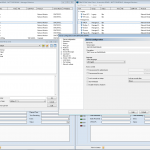
Usually one client is enough for accessing DNC Max Client to send programs or manage a CIMCO DNC Max installation, but what if you want a second window? Say for example you are working on altering some settings but still want to be able to transmit programs. There is a way now as of version 7.55.46 of DNC Max to do just this using a simple command line argument /newwin. It is … [Read more...]
Windows 10 Forces Re-Activation of CIMCO License

With the recent release of Windows 10, there has also been a side issue that has impacted CIMCO Software licensees. The upgrade to Windows 10 is causing your CIMCO products to require re-activation. If you are considering an upgrade, follow the steps in this article to prepare in advance to avoid any down-time from the license re-activation process. If you have already upgraded … [Read more...]