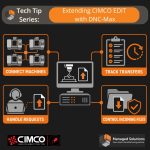
CIMCO Edit includes a built-in DNC module for sending and receiving NC programs over RS-232 serial and FTP connections. For a single machine or a small setup where one programmer handles transfers from one PC, that built-in capability handles the job well. Configure the port, name the machine, and sending a program is a dropdown selection and one click. As the shop grows, … [Read more...]
Using the Port Debug Log in CIMCO DNC Max

If you've owned or worked with any CNC equipment, you know that issues come up from time to time. Sometimes these issues affect your Machine Data Collection or your program sending and/or receiving. CIMCO provides a very useful debug feature for these very cases. This quick tip shows you how to use debug to see what is happening with one of your machine ports to maybe get some … [Read more...]
The Plea for SSD
2025 Update: In 2025 solid-state storage has cemented its dominance: PCIe 5.0 NVMe drives such as Crucial’s T705 now exceed 14 GB/s sequential reads, mainstream 4 TB models hover around six cents per gigabyte, and even 8 TB sticks can be found for under $600, bringing SSD prices within striking distance of hard-disk territory for most workloads. Meanwhile, HDD makers are … [Read more...]
How to Lock the Reset Button on Moxa Nport Devices
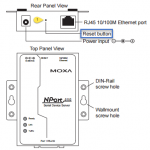
Recently we had a customer who had a number of ports go offline on their CIMCO DNC Max system. After doing some troubleshooting it was determined that all of the Moxa devices in question had been reset to the factory default IP Address of 192.168.127.254. This indicates that the reset button had been triggered. Once you've configured a Moxa NPort device for a critical DNC, bar … [Read more...]
Run Multiple CIMCO DNC Max Clients
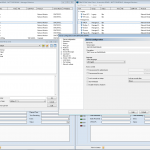
Usually one client is enough for accessing DNC Max Client to send programs or manage a CIMCO DNC Max installation, but what if you want a second window? Say for example you are working on altering some settings but still want to be able to transmit programs. There is a way now as of version 7.55.46 of DNC Max to do just this using a simple command line argument /newwin. It is … [Read more...]
What CIMCO Editor Options do I Need?

CIMCO Editor is a very powerful tool that no CNC Programmer should be without. In addition to the Editor there are four options related to CIMCO Edit: CNC Calc (Simple 2D Cad/Cam) Mazatrol Mill and Turn Viewers Communications Port (1 included effective 1/1/2019) License Server (Optional/no charge effective 1/1/2019) Extend Your CIMCO Editor Investment with … [Read more...]